

Description
Introduction to the Mikrotik Hex S
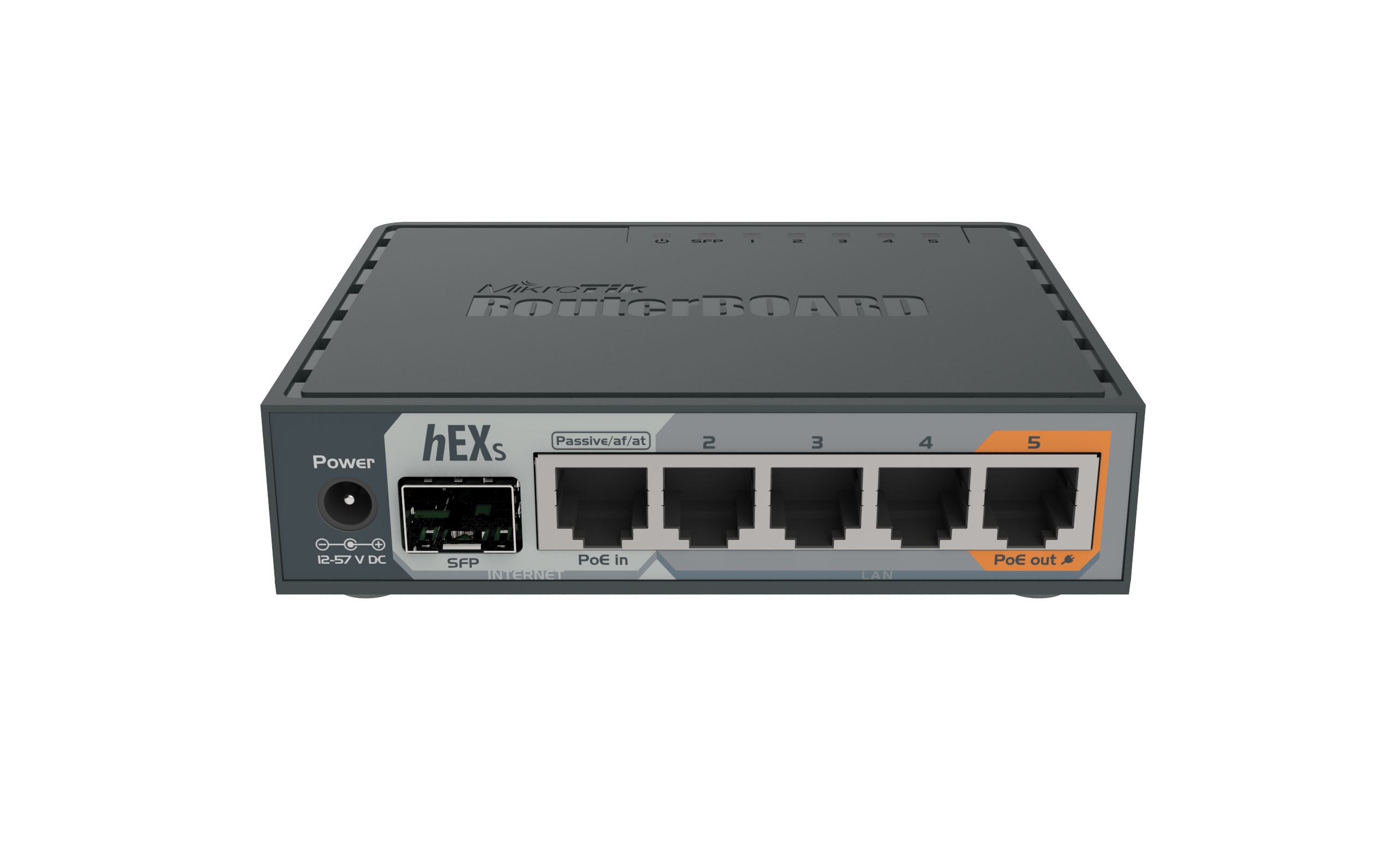
The Mikrotik Hex S is a compact and powerful network router designed for small to medium-sized businesses It comes with a powerful CPU and 256MB of RAM, making it capable of handling a large number of clients and network traffic. It also comes with five Gigabit Ethernet ports, making it ideal for connecting multiple devices to your network.
One of the standout features of the Mikrotik Hex S is its compact size. Measuring just 4.1 x 5.3 inches, it can easily fit in any workspace. It also comes with a sleek design that makes it an attractive addition to any office or home.
Key Features of the Mikrotik Hex S
The Mikrotik Hex S comes with a range of features that make it an ideal choice for network management. Here are some of its key features:
Five Gigabit Ethernet Ports
The Mikrotik Hex S comes with five Ethernet ports, each capable of delivering speeds of up to 1Gbps. This makes it an ideal choice for businesses that need to connect multiple devices to their network.
Powerful Processor
With a 716MHz CPU and 256MB of RAM, the Mikrotik Hex S is capable of handling a large number of clients and network traffic.
VPN Support
The Mikrotik Hex S comes with built-in VPN support, allowing you to set up secure connections to your network from anywhere in the world.
Dual-Band Wi-Fi
The Mikrotik Hex S also comes with dual-band Wi-Fi, allowing you to connect to both 2.4GHz and 5GHz networks.
Automated Backup and Restore
The Mikrotik Hex S comes with an automated backup and restore feature, allowing you to easily backup and restore your network configuration.
Benefits of Using the Mikrotik Hex S for Network Management
The Mikrotik Hex S offers a range of benefits for network management. Here are some of its key benefits:
Improved Network Performance
With its powerful CPU and 256MB of RAM, the Mikrotik Hex S is capable of handling a large number of clients and network traffic. This can help improve your overall network performance and reduce network downtime.
Easy to Use
The Mikrotik Hex S comes with a simple and intuitive web interface that makes it easy to configure and manage your network.
Cost-Effective
Compared to other network management tools, the Microtik Hex S is a cost-effective option that can help you save money on your network management costs.
Reliable
The Mikrotik Hex S is a reliable network management tool that comes with a range of features designed to ensure the security and stability of your network.
Setting up the Mikrotik Hex S
Setting up the Mikrotik Hex S is a straightforward process. Here’s how to do it:
Step 1: Connect the Mikrotik Hex S
Connect the Mikrotik Hex S to your modem using an Ethernet cable. Then, connect your devices to the Mikrotik Hex S using Ethernet cables.
Step 2: Access the Web Interface
Open a web browser and enter the IP address of the Mikrotik Hex S (usually 192.168.88.1) in the address bar. This will take you to the web interface of the Microtik Hex S.
Step 3: Configure Your Network
Use the web interface to configure your network settings, including your Wi-Fi network name and password, and your VPN settings.
Step 4: Save Your Settings
Once you’ve configured your network settings, be sure to save your settings before closing the web interface.
Advanced Features of the Mikrotik Hex S
The Mikrotik Hex S also comes with a range of advanced features that can help you take your network management to the next level. Here are some of its advanced features:
Firewall
The Mikrotik Hex S comes with a built-in firewall that can help protect your network from unauthorized access and attacks.
Quality of Service (QoS)
The Mikrotik Hex S also comes with QoS support, allowing you to prioritize network traffic and ensure that critical applications receive the necessary bandwidth.
VLAN Support
The Mikrotik Hex S comes with VLAN support, allowing you to segment your network and improve network performance.
Bandwidth Control
The Mikrotik Hex S also comes with bandwidth control features, allowing you to limit the bandwidth of certain applications or devices.
Best Practices for Using the Mikrotik Hex S
To get the most out of your Mikrotik Hex S, here are some best practices to keep in mind:
Keep Your Firmware Up to Date
To ensure that your Mikrotik Hex S is running smoothly and securely, be sure to keep your firmware up to date.
Monitor Your Network
Regularly monitoring your network can help you identify and address any issues before they become major problems.
Use Strong Passwords
Be sure to use strong passwords for your Mikrotik Hex S and your network devices to ensure the security of your network.
Conclusion – Why the Mikrotik Hex S is the Ultimate Powerhouse for Network Management
The Mikrotik Hex S is a powerful network management tool that offers a range of features and benefits. Its compact size, powerful CPU, and five Ethernet ports make it an ideal choice for small to medium-sized businesses. Its advanced features, such as VPN support, firewall, and QoS, make it a versatile and reliable network management tool. By following best practices, such as keeping your firmware up to date and monitoring your network, you can get the most out of your Mikrotik Hex S and ensure the security and stability of your network.

Reviews
There are no reviews yet.